 |

|
|
- utility allows You to easy, intuitive choose font face in
QuarkXPress™, Adobe® InDesign™ and Adobe® Illustrator™
- now you can choose font not only by name,
but by a typeface directly in application
- autopilot mode helps you to minimise time for finding
font face exactly you need
|
-
|
|
|
|
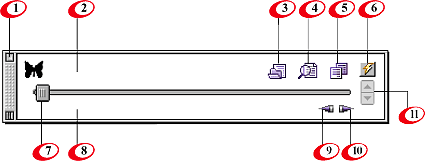
- quit program.
- font name or progress status.
- new font settings. Fonts base initialisation. It is a good idea to make font sets for different kinds of font faces, like Ornament, Serif, Special etc.
- new text settings. This way you choose text object for testing.
It may be selected text, text in selected text box or text in topmost text box when some QuarkXPress™ objects selected.
- duplicate testing text.
- turn autopilot mode ON and OFF. In autopilot mode font face changes automatically with speed and direction defined in Speed Control (11).
- font face slider. You can drag it or click on ends of it. Hot help (8) displays current font number and number of all fonts in fonts base.
- hot help display. Shows information about object.
- backward movement.
- forward movement.
- speed control. Available only in autopilot mode. Lets you choose speed and direction of movement of font face slider. Hot help displays current speed setting
|
|

 |
|
|
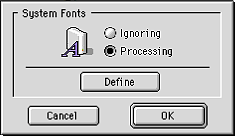
- You can define active fonts as ”System Fonts” for excluding them from fonts base. In this case You don’t need to view them every time.
|
|
|